Custom Blogger JS

Showing posts with label WSJF. Show all posts

Wednesday, March 23, 2016

Agile Portfolio & Program Management - Part III: Ultimate Agility

Executive Summary:
Using a Kanban board for Portfolio and Program Management can not only provide visibility into your processes, but also provide a path to measure and continuously improve your organization's agility.

This is the last of a three part series on Agile Portfolio & Program Management.  In Part II of this article, we discussed how a Kanban board can be applied to Portfolio and Program Management Ideation to both encourage agility while still providing oversight and governance. If you haven’t read Part II, I suggest going back and reading it first prior to this article.

In the last installment of this series on Agile Portfolio & Program Management, we are going to discuss the final validation activity, High Level Analysis, and the process prior to project launch, Project Preparation. We will also put everything together and demonstrate how a Kanban board can make the whole of a process greater than the sum of its parts. Let's get going!

Below is the basic Portfolio/Program Management Ideation process we defined for collecting, validating, and preparing ideas for implementation. Note that we included three validation gateways within the validation stage to ensure organizational alignment prior to the launch of complex initiatives.

Figure 1: Portfolio & Program Management Ideation with 3 Validation Gateways

Translating the Ideation Process to a Kanban Board
Here is how we modeled the activities of the the first stage, on our Ideation Kanban board so far.

Stage 1: Capture
Figure 2 – Kanban Columns for Idea Capture

Ideas are collected in an Idea Queue or Backlog, selected and prepared by the queue's Portfolio/Program Management product owner, where they are then scheduled for the Initial Evaluation. To learn more about the Initial Evaluation of an idea, refer back to Part I of this series.

Our ideation cards contain the following attributes:
Figure 3 – Sample Ideation Card

Card data is filled out as it moves through the ideation process.

To this point, we've discussed the first two Portfolio/Program Management gateways, the Initial Evaluation and Business Case Review.

We'll begin this discussion from the assumption that the idea passed the initial evaluation, the business case review, and that the ideation card was moved to the "Ready for High-Level Analysis" column of our Kanban board to indicate that it is now ready for High-Level Analysis.

Stage 2: Validate - High-Level Analysis
Here is how we modeled the activities of the the second stage, Validate, on our Ideation Kanban board so far.


Figure 4 – Kanban Columns for Validation
Click Image to Zoom

The Portfolio/Program Management product owner will then prioritize which items to work on next and select a card from the Ready for High-Level Analysis column. Once an idea/initiative is selected, a program or product lead should be assigned to the initiative, along with one more lead business analysts.

High-Level Analysis
High-Level Analysis is a final Portfolio/Program Management checkpoint prior to an initiative's launch.  During High-Level Analysis, the scope, cost, and basic roadmap of the the initiative will be defined and the reviewed one last time by the Portfolio or Program Management team prior to launch.

This analysis has two primary purposes:
  1. Provides just enough information to ensure that within the scope of this initiative, we are implementing the right things at the right time, and doing it within mutually agreeable budget.
  2. Provides requirements that can be dovetailed directly into our agile implementation process.
When analysis begins, one of program or project leads can move the card into the In-High-Level Analysis column of the Kanban board to indicate analysis is underway.

High-level analysis will generally consist of the following:
  • Impacted Processes, Systems, & Teams
  • High-Level Storyboards - New and/or Updated Processes & Features
  • Program/Project Epics & Features
  • Initial Program/Project Roadmap
  • High-level Cost Estimates
Impacted Processes, Systems, & Teams
Process diagrams help identify the scope of the project, along with helping to uncover impacted processes & systems.

If you don’t already maintain business process diagrams, they are severely out of date, and/or in a variety of formats, this is a tremendous opportunity for your organization to begin identifying a standard approach to modeling your business processes, technical infrastructure, and establish a definitive point in time to maintain them. Doing so, also gives you more reason to maintain them in a central repository.


Updating your process models at a consistent point in your development process, may not get every business process looking the same, but it will begin to normalize the format of these models, ensure a common location for storing them, and more importantly, identify gaps where these processes have never been fully modeled before.

More on process diagrams: 
Over time it you will find it easier and easier to perform impact analysis as your models become more current and there is less need to create these models from scratch. If you are looking for a process model standard, I recommend using BPMN 2.0 event process chains. Event process chain diagrams are extremely powerful and easy to read once you get the hang of them.

High-Level Storyboards
Some basic storyboarding can also be used to identify new and/or impacted product features and provide an idea of how they are expected to work.  David Hussman of DevJam has some great intro videos to storyboarding as well as other related techniques.  If the initiative requires a graphical interface,  consider supplementing your storyboards with basic UX designs.

Program/Project Epics & Features 
As part of your high-level analysis, you should be able to identify your highest valued epics and features.  There are various methods of doing this, but one method for this is the weighted-shortest-job-first approach or WSJF. For more information on WSJF, check out my article, 5 Steps for Using SAFe’s Weighted Shortest Job First Ratio (WSJF) for Backlog Prioritization,  on this topic.

Spending the time to define portfolio and/or program epics and features should not be throw-away work as they will end up as input to creating a prioritized list of the program and/or implementation team project backlogs. Bottom line, whatever you use for your high-level analysis output format, it should be very close in format to the epics and features that are used within your portfolio and/or program level backlog.

Initial Program/Project Roadmap
One of the core functions of the portfolio and program management teams, is to plan (or roadmap) when certain programs, processes, products, and features should be implemented. The mechanics of roadmapping your initiative and understanding internal and external dependencies would also require a separate discussion, but a high-level roadmap of your program or project is a necessary input to the process to guide release planning and backlog prioritization.

What About Risk Management?
One essential piece integrated into your roadmap, should be your risk mitigation plan.

Risk mitigation can be incorporated into your roadmap in two ways:
  1. By implementing items that have the greatest potential to delay your project as early as possible.
  2. As epics and features in your backlog no different than any other epic and feature except that they are identified as a risk epic or feature.  They are simply work that needs to be performed to reduce the risk of delay and or cost in your roadmap.
High-level Cost Estimates
Now that we have a better handle on scope, we should be able to provide cost estimates with a higher level of confidence than those provided with the original business case.  For extremely large efforts, consider only providing estimates no more than a year out at a time.  Agile budgeting requires a separate discussion, but the main objective of your budget should be to to ensure you are delivering the highest valued items of your initiative within the time and budget available to you, not committing to a definitive set of requirements within a specific time and budget constraint.

Your approach and metrics used for estimation is entirely up to you, but whatever approach you choose, planning poker, an estimation model, or locking your teams in a conference room, involving both technology and business leads during estimation gives key stakeholders a clearer understanding of the project objectives and reduces any big surprises down the road.

Too many cooks performing estimation can be a problem, so choose only the necessary people to be in this meeting. Others can attend, but they should only be observers and not permitted to speak unless there is a dedicated Q&A session at the end.

A Kanban tool can also be used to notify potentially impacted stakeholders of upcoming projects and meetings. For example, notifications can be sent to Infrastructure and Support teams when the status of cards change to a particular value, e.g. a card goes from Ready for Hi-Level Analysis to In-High-Level Analysis. This can alert them to projects coming down the pike enabling them to plan and prepare for according..

After completing an initial round of your high-level analysis, you should have a better handle on your budget, resource needs, the programs, processes, and features you plan to implement, and when to implement them. Once the the program or product lead feels the analysis is detailed enough, they can then move the card to the Ready for Hi-Level Analysis Review to signal your Portfolio or Program Management team to schedule your analysis review.

As with previous reviews, it’s recommended you set these up on a regularly planned periodic basis and make them no more than 1-2 hours.  Product owners, team leads and impacted stakeholders along with a representative from Portfolio or Program Management should be at this meeting.

Standardizing the the high-level analysis presentation materials as much as possible will ensure the presenters knows what is expected of them and your audience understands what they are reviewing.

Ideally, keep each presentation to 30-45 minutes with a 30-45 minute Q&A.  I also suggest letting a present complete their presentation prior to any Q&A or you may end up with a lot of unfinished presentations.

At the conclusion of the meeting, the representative of Portfolio or Program Management will then make a formal go or no-go decision for this initiative.

Similar to how the Business Case Review, if the idea is rejected, the card should be updated with a rejection reason and moved to the Rejected column.  If more information is needed to make a decision, update the card with the information requested and send the card back to the In-High Level Analysis column for further research. If approved, the card is moved forward into the Ready for Project Setup column.

Project Preparation
Finally, when work in the Ready for Project Setup column is ready to be worked on, a designated Portfolio/Program management resource can then move the card to the In-Project Setup column.
Remember that the "Ready" columns should be treated like a backlog and will require someone to be responsible to prioritize and ensure the cards have all the necessary information to proceed.

Figure 5– Kanban Columns for Project Prep.


Project Preparation is the process by which specific resources may need to be procured or configured and/or environments set up prior to moving the work into the appropriate execution team’s backlog. You might even use this point in time to create a collaborative charter for your program or project team.

Collaborative Chartering
Collaborative charters are a great way to kick off a project. These are not the pro-forma charter usually required by executive management that get filed away never to be seen again.  Collaborative charters are generally 1 or 2 page documents that outlines the purpose of the your project, the stakeholders involved, and any working agreements. They get everyone on the same page, literally, and also help when onboarding new team members, to understand the purpose of the project and who's who.  For more information on collaborative chartering, here’s an excellent video by David Hussman on the topic.

Once necessary resources are readied and the work is migrated to the appropriate team backlogs, your ideation card can be moved into the Project Prep Complete column and project implementation can begin as scheduled.  You could keep extending the Program and Portfolio management Kanban boards all the way thru development and even operations rollout, but this essentially completes the Portfolio/Program Management Ideation process, and your card moves to a "DONE" status. I've colorized this column green, to emphasize the process is done and ready for the next stage of development.

The Complete Portfolio/Program Management Ideation Kanban Board

Putting it all together, our Portfolio/Program Management Ideation Kanban Board looks like this:

Figure 6– The Entire Portfolio/Program Management Ideation Kanban Board
Click Image to Zoom

From one diagram, you can see what cards are waiting to be worked on in, what cards have been rejected or approved, what cards are in process, and what cards are ready to be implemented. If you want more information, you can view each individual card for initiative details, decision rationales, and task assignments.

Taking Your Agility to the Next Level
Another benefit of having the Portfolio/Program Management process maintained within a Kanban board, is that it provides a great way to measure the average time each card spends within each activity, as well as the average total time (cycle time) it takes to get from the Ideation Backlog into the hands of the implementation teams. Capturing average activity times and cycle time enables you to identify where you are experiencing bottlenecks, determine the impacts of changes to the process, and provides a measure for your organization's overall agility. Activity and cycle times are measures that all members of an organization can easily understand and can be used a simple way to communicate the overall health of your organization.

To take your agility to the next level, your Kanban board can even be used to communicate status. Imagine the time saved and the increase in productivity by minimizing and possibly even eliminating status reports and status meetings with real-time status and metrics accessible to anyone, anytime.  Doing so, will focus meetings you do have on removing impediments and celebrating victories. And isn't this what agile is all about?!

Using the Portfolio & Program Management Ideation process, we've demonstrated how Kanban can be used to improve organizational agility by simplifying complex processes, providing organizational transparency, and even provide real time agility metrics and a method for status reporting without the status reports.

Now that you have a basic understanding of the power of Kanban, what ways can your organization use Kanban in the pursuit of ultimate agility?


I hope you've enjoyed this series on Agile Portfolio & Program Management as much as I have, I would be grateful to hear you feedback, experiences, insights, and suggestions. Thank you!

Tuesday, March 22, 2016

Agile Portfolio & Program Management – Part II: Governance

Executive Summary:
Capturing great ideas, obtaining consensus on their definition, objectives, budgets and schedule can be a complex and daunting process within any organization . Using a Kanban board, the Portfolio and Program Management ideation process can be structured to provide organizational oversight without impeding organizational agility.


This article is part of a three part series on Agile Portfolio & Program Management.  In Part I of this article, we discussed how a Kanban board can be applied to Portfolio and Program Management for the capture and approval flow of new ideas and suggestions.  If you haven’t read Part I, I suggest going back and reading it first prior to this article.

Below is the basic Portfolio/Program Management Ideation process we defined for collecting, validating, and preparing ideas for implementation. Note that we included three validation gateways within the validation stage to ensure organizational alignment prior to the launch of complex initiatives.

Figure 4: Portfolio & Program Management Ideation with 3 Validation Gateways

Translating the Ideation Process to a Kanban Board
Here is how we modeled the activities of the the first stage, Idea Capture, on our Ideation Kanban board.

Stage 1: Capture
Figure 5 – Kanban Columns for Idea Capture

Ideas are collected in an Idea Queue or Backlog, selected and prepared by the queue's Portfolio/Program Management product owner, where they are then scheduled for the Initial Evaluation. To learn more about the Initial Evaluation of an idea, refer back to Part I of this article.

Our ideation cards contained the following attributes:
Figure 6 – Sample Ideation Card

Ideation card data is gradually filled in as it moves through the ideation process.

In the Portfolio/Program Management Initial Evaluation, the Portfolio/Program Management Team determined if the idea can be fast-tracked directly to Project Prep activity, or requires a business case developed for further evaluation.

For those ideas that required further portfolio or program evaluation and analysis, we documented the reason within the ideation card, and the card was moved to the Ready for Business Case Development column of the Kanban board.

We'll begin this discussion from the assumption that a business case is required for this idea and a card for this idea resides in the "Ready for Business Case Development" column of our Kanban board.

Stage 2: Validate - Business Case Development


Figure 7 – Kanban Columns for Validation - Click Image to Zoom


Up until now, our evaluation of ideas has required a limited set of data and informal discussions. Now that we are considering a reasonably sized initiative, we want to provide just enough information to get thru the second gateway in the process, Business Case Development.

Once a card moves to Ready for Business Case Development, a task or tasks can then be assigned to the submitter of the idea, the product manager impacted by the idea, or an appropriate stakeholder, to create the business case deliverables for this item.

Business Case Development
As with this entire process, keep the business case deliverable simple. You should be able to boil it down to reusable template of no more than 1 or 2 pages of PowerPoint slides and some appendices.

Items to consider in your business case are:
  • Impacted business area of the organization
  • Impacted business strategic area or theme
  • A high level description of the suggestion (1 or 2 sentences)
  • The financial investment rationale for the suggestion (1 or 2 sentences)
  • ROI chart by investment, revenue, expenses (1 – 5 year)
  • Scored Costs & Benefits (Fibonacci scored or simply High, Med, Low)
  • Metrics used to gauge success or failure of suggestion
  • Assumptions
You will likely have other items to add or remove based upon your own organization. The more you can standardize this information the better.

Here's how one organization structured program and project business cases into a single snapshot.

Figure 8 – Sample One-Page Business Case Template

Note that the Benefits & Costs sections of a business case are further elaborated in a separate more detailed document (not shown).

Once the business case deliverable is ready for review, the Product Manager, or appropriate stakeholder, can move the card into the Ready for Business Case Review column. A card in this column alerts Portfolio or Program Management that item should be prioritized and scheduled.

Just like the initial review, business case reviews should happen on a predictable schedule and be no more than 1 -2 hours. Once scheduled, the scheduler can move the item into the In-Business Case Review column.

The Business Case Review
The overall objective of the business case, is to demonstrate the organizational value returned by the initiative within a specified time frame.

The value identified, should be something you can quantitatively measured to determine success or failure of the initiative.

Your business case review should result in one of three paths:
  1. Rejected - The idea’s investment/costs outweighs its value.
  2. Business Case Refinement Needed – Further refinement of the business case is needed in order to make a decision.
  3. Accepted - The idea seems feasible, in alignment with company strategy, its business value seems clear, but its complexity requires a deeper analysis for further assessment to validate this.
For rejected business case’s, the rejection reason should be documented on it's card and moved to the Rejected column.

If a business case needs additional refinement, perhaps there are some unanswered questions, these requests should be documented and the card moved back to the In-Business Case Development column and rescheduled once the information has been gathered and the card is ready for review again.

If the business-case is approved, it should move to the Ready for High-Level Analysis column of the Kanban board.  Note that it's possible that as a result of the business case review, it's determined the idea can be fast-tracked, and moved directly to the Ready for Project Prep column.

Leveraging a Kanban board to monitor the flow of the Portfolio & Program Management Ideation process, we've demonstrated how Kanban can be used by the Portfolio/Program Management team to provide a clear and transparent process, ensure appropriate governance of larger initiatives, and still encouraging agility by only requesting just the right amount of information at the right time.

It takes time for governance processes to evolve.  If you like the idea of a Kanban board to manage these processes, I recommend starting out by mapping your existing process activities first without consideration to Kanban, then once everyone agrees on the process, only then should you begin translating it to a Kanban board.

It's rather daunting to approach existing complex processes within any organization.  Part of agility is being able to evolve and improve. Be sure to incorporate periodic retrospectives to continually review your processes with your team and make incremental improvements along the way.

In the next and final article in this series on Agile Portfolio & Program Management - Ultimate Agility, we are going to discuss the final validation activity, High Level Analysis, and the the Project Preparation stage. We will also put everything together and demonstrate how to monitor and continually improve your overall organizational agility.

It would be great to hear about your experiences with addressing organizational governance, get your feedback on Portfolio & Program Management, and any suggestions you may have.

Friday, March 18, 2016

Agile Portfolio & Program Management – Part 1: Ideation

Executive Summary:
Being able to evaluate the influx of project ideas in large organizations can be a tedious and time-consuming process for management, and a confusing process for stakeholders. Using a simple Kanban board for the process of collecting and approving these suggestions, helps guide stakeholders through the process, provides approval visibility, and most importantly, prevents the loss of some really great ideas.


Agile Portfolio and Program Management - Ideation

This article is the first of a three part series on Agile Portfolio & Program Management.

For quite some time now, both small and large organizations have been successfully executing agile and Kanban practices to manage individual projects at the team level, but one often overlooked area, is where agile and Kanban can be applied to portfolio and program management, especially at the point of ideation.

Simply stated, ideation is the process by which new ideas are captured, evaluated, and if approved, prepared for implementation. Ideation is the inflow of ideas and suggestions to both portfolio and program management. These ideas and suggestions may relate to the development of new programs, product enhancements, new products, improvements to a process, changes in infrastructure, or just about anything that a stakeholder might want to do that they think brings value to the organization.

Some Basic Terms:
Portfolio Management is the activities an organization performs to determine its overall strategic goals (e.g. Customer Care, Mobilize Workforce, Operational Efficiency) and the tactical programs made up of various initiatives to achieve those strategic goals. These types of strategic goals are referred to as Themes in Dean Leffingwell’s SAFe (Scaled Agile Framework) methodology.

Program Management is the process by which the organization prioritizes, manage dependencies, and oversees the implementation of initiatives within each program. These initiatives are performed at the team level.

Here’s a bird’s-eye view of the Portfolio & Program Management ideation process:

Portfolio & Program Management Ideation
Figure 1: Portfolio & Program Management Ideation - Bird's Eye View

Because new initiatives may impact a significant number of teams, customers, clients, and/or may require lots of resources, some level of governance is usually instituted to evaluate and validate these ideas to confirm their value (i.e. value returned over time vs. investment & expenses). If approved, these ideas are then formalized for implementation. Unfortunately, this evaluation and approval process can be very time consuming and complex, involving multiple sign-offs, reviews, documentation, and impact multiple teams and systems etc. This is where Kanban can come to the rescue!

Unfamiliar with Kanban? - Here is the basic Kanban pattern:
Within Kanban, although there are many ways to tweak a Kanban board, at its simplest, a Kanban board uses the following to represent the flow of work within a process.

Figure 2: A Simple Kanban Board

Work is represented by a card containing a description of the item being worked on.
Work cards begin in the To-Do column, when work is selected from the To-Do column to be worked on it is assigned to someone and the card is moved into In-Process column. When work is complete, the card is then moved to the Done column. By looking at a Kanban board, you can see what work still needs to be addressed, what is currently being worked on, who is working on it, and what work is completed.

A Kanban Model for Ideation
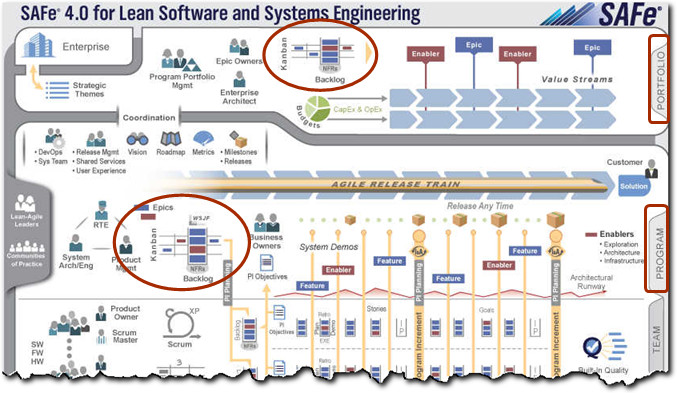
You don’t need to be implementing the Scaled Agile Framework to use Kanban for ideation, but since the release of SAFe 4.0, the SAFe framework also encourages the use of Kanban for handling ideation.

Figure 3 – Kanban Portfolio & Program Ideation in Safe 4.0 - Click Image to Zoom

The only issue with this recommendation, is that SAFe doesn't necessarily tell you how to implement this process, that's up to you.

Having worked with organizations attempting to tackle this problem, I’d like to outline a generic approach involving three validation gateways that can help your organization simplify this process, make it more transparent, and improve your overall evaluation and approval (aka cycle) times.

Here's a revised bird's-eye view of an ideation process with three validation gateways.

Figure 4: Portfolio & Program Management Ideation with 3 Validation Gateways

Gateways are activities performed by a Portfolio-Program Management team and/or a PMO to ensure organizational initiatives are aligned with the organization's strategic goals, feasible, provide timely value to the organization, and if so, are budgeted appropriately.
The next step is taking this process and representing it as a Kanban board to manage and monitor the ideation workflow and gateways until the idea is ready for implementation.

Your Kanban board can be a physical board on a wall, an electronic board using software like VersionOne , Atlassian’s Jira, or Leankit. You might even consider using both physical and electronic boards.

I like to use the term ‘Ready’ for work that is ready to be worked on (i.e. To-Do), once work begins, a card is moved to an ‘In-Process’ column, and when work is completed, that work is then moved into a ‘Done’ column. If the there is another activity in the process chain, the card can be moved into another ‘Ready’ column.

Here’s how the idea capture process might be represented.

Stage 1: Capture
Figure 5 – Kanban Columns for Idea Capture

First we capture the idea as a card in a queue or backlog (To-Do), we then may need to do some cleanup and preparation on the idea to prepare it for a formal review (In-Process), and finally after it is ready to be reviewed, we move it to the ‘Ready’ column awaiting to be reviewed in the Validation stage. You could consider this its own independent Kanban board, in which case the ‘Ready’ column would be considered ‘Done’, or if we expand the board to include the evaluation process, it would be considered as a ‘To-Do’ column.

Essentially, anyone in the organization should be allowed to submit an idea, but you may want to establish some of your own limits on this as well as a standard set of attributes and supporting documents you want to include on your ideation cards. Consider setting up a general mailbox account to receive ideas and have someone from the program or product management team actually enter each suggestion into a queue rather than allowing anyone to create cards directly.
The card attributes you choose should primarily be configured to handle different levels of analysis and evaluation.

As a guide, try to keep things simple and only require the submitter to include the information needed for each upcoming step rather than trying to capture everything at once. For more detailed information, incorporate the ability to associate supporting documents to card via links and/or file attachments.

Here are some example ideation card attributes. You will need to determine what works best for your ideation process:
Figure 6 – Sample Ideation Card

For continuous process improvement, you should be reviewing and refining your overall process, the board columns, and the card attributes on a periodic basis; think ‘agile retrospectives’.

Another important aspect, is to have a product owner to manage the Ideation Backlog/Queue. The product owner is responsible to groom the queue, ensure appropriate information is included for each card, merge duplicates, remove obsolete items, and prioritize which items should be reviewed next. The product owner will move cards they wish to work on into the In-Initial Evaluation Prep column. During this time, they may need to go back to the submitter for additional information or clarification. Once an idea has all of the appropriate information, the product owner will move the card into the Ready for Initial Evaluation column.
Now that you understand the basic Kanban board flow, let’s look at a process that involves three sets of activities.

Stage 2: Validate

Figure 7 – Kanban Columns for Validation - Click Image to Zoom.

Initial Evaluation
Once a card is in the Ready for Initial Evaluation column as a result of our idea capture process, the product owner or someone designated from Portfolio or Program Management can decide when to schedule this item for review. Note that the Ready for Initial Evaluation column is technically, the backlog (To-Do) for the Evaluation section of the Kanban board. Any card that shows up in this column is a signal to the owner of this queue to do something.

It’s recommend that you have specific periodic days each month or each quarter for this initial review. E.g. The third Tuesday of every month. The person, who scheduled the item, should pull those cards into the In-Initial-Evaluation column of the Kanban board, the week or month that that the review is expected to occur. This gives the reviewers a head-up on what items are coming up.


The first evaluation should be more of a discussion rather than a formal presentation, with the goal to determine if the idea has promise and is worth evaluating further.

Appropriate management, business stakeholders and tech leads should be invited to this session. The meeting should probably be no more than 1-2 hours, but this is entirely dependent on your process. Over time, you will get a sense as to how many cards can be scheduled for one evaluation session and you can set a work in process limit for the In-Initial-Evaluation column.

Your initial evaluation should result in one of three paths:
  1. Rejected - The idea is not feasible, may not be appropriate for the business, or may already be addressed by an initiative in-flight.
  2. Fast-tracked - The idea is clearly feasible, in alignment with company strategy, its business value is obvious, and is small enough that it could move directly to a team’s feature or story backlog.
  3. Portfolio/Program Governance Required -The idea seems feasible, in alignment with company strategy, there is potential business value, but its complexity requires a deeper analysis for further assessment to validate this.
If you determine that the idea is not worth pursuing or is already being addressed the idea is rejected; the rejection reason should be documented on the card and moved directly to the Rejected column of the Kanban board.

If an idea’s value is obvious and small enough, it can be fast-tracked to project preparation, where requirements can be cleaned up, outstanding questions answered, and an implementation team assigned so that it can be added to that team’s feature or story backlog. Document the fast-track reason on the card, and move it to the Ready for Project Setup column.

Examples of fast-tracking might be application cosmetic and/or content changes, minor feature requests, and minor process changes. If it’s not obvious, consider sending it thru the full evaluation process, you can always re-route it back to project setup via fast-tracking.

One approach to determine fast-tracked items is to use the number of teams involved or impacted by the suggestion. If it requires two or less implementation teams, it can be fast-tracked and go directly to Ready for Project Setup, three or more teams may require the full portfolio/program management evaluation and analysis process.

When an idea requires further portfolio or program evaluation and analysis, the reason should be documented within the card, and the card moved to the Ready for Business Case Development column of the Kanban board.

A great feature of many online Kanban tools, is that they can also serve as a workflow application.
Cards can have tasks associated to them within each activity and tasks can be assigned to people. Once a card moves to Business Case Development for example, a task can then be assigned to the submitter of the idea, the product manager impacted by the idea, or an appropriate stakeholder, to create the business case deliverables for this item.

Identifying which tasks are performed during each activity ensures the process is followed, all appropriate information is gathered when needed, provides real-time status, and an audit trail. You may still consider maintaining a simplified physical board somewhere so that anyone can see it a glance what is going on during the ideation process.

By this point, you should have a basic understanding what ideation is, how Kanban can be used for Portfolio and Program Management ideation to, serve as a process guide for stakeholders, how Kanban tools like VersionOne and Atlassian’s Jira can be used for workflow management, how Kanban boards provide visibility into the current state of work, and finally how to use Kanban to prevent the loss of valuable ideas.

In Part II of this three part series on Agile Portfolio & Program Management, we'll discuss the next step in the validation process,  learn how to create a 1-page business case, and how to incorporate organizational oversight into the process while still encouraging organizational agility.

I’d love to get your feedback, hear about your ideation experiences, or or anything agile.
In the meantime, keep those ideas coming!

Tuesday, December 15, 2015

Agile Release Planning - Aligning with Executive Management


Executive Summary:
For longer-term technology projects, a quarterly planning Kanban board will not only help with release planning, but is also a great way to align program management with executive management on releases, resource capacity planning, costing, and ongoing project status reporting.

Quarterly Planning Kanban Board. 


In a previous article, I discussed methods to break down your product epics and features that were understandable to both executive management and product stakeholders, along with how to use the SAFe weighted shortest job first (WSJF) method to prioritize these features. In this article, I'd like to discuss a clear and simple way to present your agile release plans to executive management.

As part of agile release planning, you will need to identify epics and features that will be implemented over longer periods of time.  It's said that a picture is worth a thousand words, but with the advent of many new agile tools,  too many pictures can sometimes be overwhelming and information can get buried, especially when trying to communicate plans to executive management. This often results in miscommunications and many long unnecessary status meetings. As a program and/or product manager, it's critical you find a communication approach for both you, your teams, and more importantly, you executive management, that clearly, and accurately, depicts your initiative's plan and status.

Let’s look at the previous initiative example I presented for integrating a cloud-based HR system into your existing environment to replace a legacy HR system.

A simplified set of phases of the project identified were as follows:

Integrate new cloud-based HR System
·                  Environment Setup
·                  Integrate vended application with existing legacy systems
·                  Migrate existing employee & contractor data into vended application

These phases are what I would call super-epics.
After further analysis we came up with the following sub-epics and features for the Integrate phase:

Here is an example of expanding the Employee Update epics within the Integrate phase into features.

(Super) Epic
Sub Epic
Feature
Team A
Team B
Team C
Vendor A
. . .


HR Cloud Integration
Employee Update
HR Cloud Core Data Update

X
X
HR Cloud Integration
Employee Update
Facilities Location Update
X
X
X
HR Cloud Integration
Employee Update
Telecom Update


X
X
. . .


Example Epic and Feature Analysis by Team.

Note that we are expressing our epics and features from a business standpoint and not from a technical standpoint. We know which systems are impacted by identifying which teams need to be involved to execute specific features.  So Team A might represent the Facilities system, Team B might represent the new HR system, Team C might represent the Telecom system, and Vendor A might represent the HR System's vendor.

If these were architectural epics, of course we would reference specific tools, systems etc., because from an enterprise architecture standpoint, these systems, tools, and middleware are their business. Make sense?


  • From executive management’s standpoint, they are primarily interested in when the main project phases (super-epics) will be completed and how much it’s going to cost them.
  • From a program manager’s standpoint, they are primarily interested in when the epics (super-epics and sub-epics) will be completed and are they on or over budget. 
Note that you can call these levels whatever you want, but the point is that what management likes to see is generally at a much higher level than what execution/implementation teams like to see, and that you just need to be conscious of this. Some tools like Jira Portfolio can help you align these differences.

Here's another way to think about it.

Keeping in-line with Dean Leffingwell’s scaled agile framework (SAFe) concepts of implementing interconnected Kanban and SCRUM boards to manage a company’s portfolio initiatives, programs, and associated projects, we get this hierarchy of epics, features and user stories where epics represent executive strategy, features represent program management, and stories represent the tactical execution of programs.

Image Source: adapted from http://versionone.com Enterprise Agile presentation. 


 To help align both program/product management and executive management for longer-term planning, and to ease management into concepts of lean and agile such as Kanban boards, epics, and features, I recommend starting off with a Kanban board based on quarters. 

Here’s the basic approach.

At its simplest, each column on the Kanban board represents one quarter and an epic is placed in the quarter that it is scheduled to be completed.  Within each epic you can include the features that are planned to be released within that epic. It’s up to you to define your definition of done for each item on the board, and everyone should be very clear about what this means. i.e. is it just user acceptance tested, or does it mean it’s been rolled out to the field.

You can include as many quarters as you want, but I’d recommend making no more than 6 – 8 quarters at a time. You can reuse previous quarters on the board about every 6 – 9 months.  This view shows only the current year, but you can include quarters from the previous year and next year as well.

Quarterly Planning Kanban Board. 

I encourage program management to maintain this as a physical board in a place where executive management will see it as well as the entire team.  For remote teams, you can also maintain this in tools like Jira and VersionOne, but just be sure that you incorporate a process to ensure this has constant visibility.

Note that an epic may appear in multiple quarters because features within an epic will likely be incorporated into different releases. You can further refine this board by using color post-its or indicators on the post-it, to indicate whether something is on-schedule, delayed, or has a major blocker, and/or you might consider adding traditional "To-Do", "In-Process", and "Done" Kanban columns within each quarter.

Additionally, horizontal columns can be used to indicate which team is primarily responsible for which feature. You might even indicate specific release trains on the timeline as well.

Quarterly Planning Kanban Board with Team Columns. 

And yes, it's not that much different than a traditional calendar, but it's familiarity and bridge into agile concepts is it's key benefit, not to mention it can easily be incorporated as a Kanban board in just about any agile tool.

Another valuable dimension that can be represented here are the points and/or hours for each feature as well as the total points or hours for the quarter and for each team over a period of time. This allows you to plan and identify team commitments, constraints, and availability, along with a rough idea of both team and quarterly estimated costs. After a quarter has completed, you might even show planned versus actual hours to help with the next period of planning.

Quarterly Planning Kanban Board with team and quarterly hourly totals.

Deciding what to include and how to manage the quarterly Kanban board is something that will evolve over time and will be determined by your project and organizational needs.

If you focus on information that maximizes the value provided to your management teams and minimizes the effort to manage the board itself and you will find that implementing a big visible quarterly Kanban board will help bridge the gap between executive management and program management and help reduce unnecessary project status meetings saving everyone's time.

I would greatly welcome your feedback and experiences regarding agile release planning and management.

Blog header Image Source: theflowcentre.com

Thursday, February 13, 2014

5 Steps for Using SAFe’s Weighted Shortest Job First Ratio (WSJF) for Backlog Prioritization


Exec. Summary:

By combining a ratio of business value to effort with the use of planning poker, a simple and standardized ratio can be used to help guide organizations in the process of backlog prioritization.

After wearing many SDLC hats over the past twenty plus years in the tech consulting arena including developer, data architect, systems analyst, business analyst, project manager, and product manager, I have come to greatly appreciate many of the principles found in the agile framework and its supporting techniques.  One of the more intriguing agile developments is applying agile not just to development teams but applying it upwardly throughout an organization including executive management.

Once such development in this field is Dean Leffingwell’s Scaled Agile Framework (SAFe) which uses interconnected Kanban and SCRUM boards to manage a company’s portfolio initiatives, programs, and associated projects.  A key idea here is that an organization’s initiatives can be broken into quarterly sized chunks of work,or epics at a portfolio level (management strategy), these epics can then be broken into monthly sized chunks of work, or features at a program level (coordination), and features can be broken into sprint sized chunks of work, usually two-week user stories, at the project team level (execution).  The actual durations of these three levels is really dependent on what your teams are comfortable with when doing work estimation.

Portfolio Pgm Project
Image Source: adapted from http://versionone.com Enterprise Agile presentation.

One of the more difficult tasks to perform is a consistent way for management to prioritize business and architectural epic and feature backlogs. SAFe proposes an interesting approach called Weighted Shortest Job First (WSJF).  In a nutshell WSJF is a ratio of an item’s business value to the size of effort to implement it (duration).  Items with a higher ratio bring the greatest business value soonest and therefore should be implemented first.  If you are already familiar with these concepts and want to get to the 5 steps, you can go to Step 1 here.

SAFe suggests that business value be driven by a concept called Cost of Delay (COD). Essentially opportunity cost to delay implementation of some functionality.  COD will be specific to your situation.

SAFe breaks business value into three categories:

1) Value to the User and/or Business – This includes impacts of delays on revenue, expenses, penalties, market share.
2) Time Criticality to User and/or Business – The impact of implementation delay to deadlines, regulatory requirements, user trust, and other dependent projects.
3) Risk Reduction or Opportunity Enablement – The risk reduction or unlocked potential of business opportunities that may be lost or gained based on delaying the release of functionality.

For work effort, the bottom half of the ratio, ideally you want to express this in terms of time. 

So the resulting ratio of a functional requirement looks something like this:

WSJF = User/Business Value + Time Criticality + Risk Reduction / Time


Business value is measured in relative points, like Fibonacci story points, and time is measured in work duration. e.g. days, hours, etc.

The higher the ratio the higher the value of the item being evaluated should be to the business.

If some of these factors makes sense and some sound difficult to quantify, I wholeheartedly agree.

On a recent engagement with a well known movie and game rental company, let’s just call them Bedrocks,  I guided a pilot project to test out some SAFe concepts to see how well they would fare for managing several projects and providing prioritization guidance to the implementation teams. We liked the concept of the WSJF but arriving at the necessary values seemed challenging.
Participating teams included a newly formed Enterprise Product team,  and one of the architectural platform teams. Note that Bedrocks was just one of a few lines of businesses managed by Bedrock’s parent company. The Enterprise Product Team which was part of the parent company, oversaw product management for all lines of businesses, and the architectural platforms, also part of the parent company, served all lines of businesses as well.  This is actually a critical point because a method was needed to determine which line of business got access to a limited set of enterprise technical resources first.

We visualized our Epics on a Kanban board that used 4 quarters to plan our epics (Q1, Q2, Q3, Q4) and those epics linked to a child Kanban board of features represented in SDLC phases (Ready for Analysis, Analysis, Design, Build, Test, Ready to Deploy, Deploy). Don’t get too caught up in this part, this will be specific to your own environment and I’ll discuss visualization in another articleThe key to using this process is learning how to break down your work into manageable chunks that are understandable by the users  at the Epic level (executive & program/product management) and the users at the Feature level (program/product management and project management).
To attack the complexity of this process we followed the keep it simple rule.
Before even touching a Kanban board we created our own spreadsheet to manage program epics, features, and WSJF ratios. 

Here are the five steps we took to to aide us in prioritizing product features from multiple projects leveraging the Weighted Shortest Job First (WSJF) ratio.

Some Assumptions:

  • Executive Initiatives consist of one or more programs.
  • Programs consists of one more projects.
  • All organizational programs and their associated projects that affect our pilot implementation teams are known.
  • Epic sizes should be no more than 3-4 mos.
  • Features sizes should be no more than 4–5 weeks.
  • Product Owners, Product Managers, and Technical team leads and architects impacted by a program are part of the epic and feature breakdown, estimation, and prioritization process for that program. 
  • You may decide to include some relevant project managers as well if it will help you define the pieces of the project.

Step 1: Break your Programs into Epics

For each project within a program, everyone in the room will need to agree on the major phases of functionality required to implement each project.  So for example, if you are integrating a cloud-based HR system into your existing environment to replace a local legacy system, some of those hi-level phases might be something like this:
  • Environment Setup
  • Integrate vended application with existing legacy systems
  • Migrate existing employee & contractor data into vended application
Determine if each epic is inside approximately 3-4 months of work, preferably 3 or less.  This is where the tech leads and architects come in handy.
If not, break the items down further into sub-epics. Don’t get hung up on the durations just yet, you’ll be able to come back and correct this later.
So maybe further discussion produces the following:
  • Environment Setup 
  • Integrate vended application with existing legacy systems
    • Employee New Hire 
    • Employee Update
    • Employee Terminate
    • Contractor New Hire
    • Contractor Update
    • Contractor Terminate
  • Migrate Employees
    • Employee Core Data (name, role, team,  phone, supervisor, etc.)
    • Employee Benefits
  • Migrate Contractors
When you populate the WSJF spreadsheet, if something has a parent and sub-epic enter them in the Epic and Sub-Epic columns respectively.

Here are the ten epics we have so far:
Epic Sub Epic
HR Cloud Environment Setup n/a
HR Cloud Integration Employee New Hire
HR Cloud Integration Employee Update
HR Cloud Integration Employee Terminate
HR Cloud Integration Contractor New Hire
HR Cloud Integration Contractor Update
HR Cloud Integration Contractor Terminate
HR Cloud Data Migration Employee Core Data
HR Cloud Data Migration Employee Benefits
HR Cloud Data Migration Contractor Core Data

You might have expected me to reference each  legacy system that needed to be integrated with at this point, but I didn’t for good reason. In general, you want to express your epics and features in terms of something the user will understand when validating if the system works and users generally understand vertical slices of functionality easier rather than which systems or databases need to be plugged into. In the case of architectural epics, because the users who will verify the system works properly are technical people, the epics and features may appear to be very technical. The first epic in this list ‘HR Cloud Environment Setup’ is likely an architectural epic where features might be to ‘Setup Dev Environment, ‘Setup Test Environment’, etc. There may even be architectural epics to set up new data centers and/or middleware as well.

Expressing things in vertical functional slices also helps the user prioritize easier and let’s us know when something is truly done.
We’ll see shortly how we know which systems are affected.
Step 2: Break your Epics Into Features
Take each Epic and break them into logical chunks of work that can be accomplished in 3-4 weeks.
Let’s take a look at HR Cloud Integration – Employee Update
When we edit an existing employees name, team, phone, desk location, or supervisor, we may want that information to show up in the employee directory. Here are some sample features related to this epic.

HR Cloud Integration – Employee Update Features:
  • Cloud Core Data Update (name, team, role, supervisor)
  • Facilities Location Update (building, floor, office#)
  • Telecom Update (desk phone, co. mobile phone)
The HR system is the source system of data for things like name and team, but in some cases there may be other systems like Facilities, and Telecom which are the source system of an employees location and phone number respectively and changes to that data must be sent to the HR system and perhaps other consumer systems but we’ve still expressed this as vertical slices of functionality that may or may not be restricted to one system.  You may also have to break your features into sub-features if they don’t seem like something you can get down in about 4-5 weeks.

Starting to get the idea here?

Before you can continue, the technical leads and architects should go thru each feature and identify which teams may be impacted (i.e. have some work to perform) relative to each feature.  You can enter this in the WSJF spreadsheet template by listing each team in it’s own column heading and then placing an ‘X’ in the cell corresponding to a feature. Teams may be architectural teams, development teams, vendors, etc. I’ve hidden the other Epics for simplification.
Epic Sub Epic Feature Team A Team B Team C Vendor A
. . .
HR Cloud Integration Employee Update HR Cloud Core Data Update X X
HR Cloud Integration Employee Update Facilities Location Update X X X
HR Cloud Integration Employee Update Telecom Update X X
. . .

Identifying the teams will make it very clear what resources are needed, which systems are impacted, and where user stories needed to be written to complete a vertical functional slice. You could potentially list systems instead of teams but the way things were structured at Bedrocks there were dev teams responsible for systems and some teams that provided general platform support like Database Admin/BI, and Enterprise Infrastructure (networking). In a ideal agile world their would be one co-located team.

Step 3: Have your product owners use planning poker to assign feature business value.
Once you feel you’ve documented all of your epics and features it’s time for the fun part. If you discover some new epics and features later, no worries, you’ll just need add them and prioritize these as well.
Using the spreadsheet provided, your product owners, program managers, and possibly managers need to go thru each feature and assign a relative score based on the Fibonacci series in terms of value.
Everyone should understand the concept of cost of delay and discuss the different kinds of value that a feature may have.  We felt it was far easier to just have one score versus different scores for each type of business value as SAFe suggests.  To arrive at that one score when multiple people are involved, I highly recommend planning poker.  We used the following values (1,3,5, 8, 13, 21) but you can use any range you want.
By using planning poker, it provides a great platform for managers of different systems to discuss why they think one feature is more important than another.

Step 4: Have your technical leads use planning poker to assign feature T-shirt sizes (high level estimates).
The next step is to have your technical leads and architects identify high-level T-shirt sized estimates for each feature.  If you have more than one technical lead or architect involved in this process, I recommend using planning poker in the same way you did for business value. Another chance for great discussion amongst all of the tech leads. This also let’s different teams get a greater appreciation for what another team does and/or input it needs to do it’s job, especially when considering integration of systems.

Before beginning this step you’ll need to agree on your work-effort sizes, assign an expected duration to each size in days, and optionally a relative point value. 

Here’s how we did it:
T-Shirt Size Time (days) Story Points
XS 1 1
S 7 2
M 14 5
L 30 8
XL 60 13
XXL 90 21

T-shirt sizes provide a very general way of describing effort without getting into too much detail.
Step 5: Review your WSJFs and Feature Dependencies to determine the order of your Feature Backlog.
Now that you have identified the business value and rough time estimate for each feature, you can now calculate your Weighted Shortest Job First (WSJF) ratio. Using the provided WSJF spreadsheet, your ratio will be automatically calculated for each feature. 
Epic Sub Epic Feature Bus Value T-Shirt Size Time (days) WSJF Story Pts
. . .
HR Cloud Integration Employee Update HR Cloud Core Data Update 21 XL 60 0.35 13
HR Cloud Integration Employee Update Facilities Location Update 5 M 14 0.36 5
HR Cloud Integration Employee Update Telecom Update 13 M 14 0.93 5
. . .

As each feature is entered in your backlog you can now include the WSJF and optionally the business value and t-shirt size associated with that feature card.

An interesting side effect of using this approach is that some features will have really low values because they take a long time to implement. To increase the features value it will be necessary to break it down into smaller pieces that can be implemented in a shorter period of time. In the example above the HR Cloud Core Data Update was estimated at 60 days. Breaking it down into smaller vertical functional slices that can be completed in 30 days or less will make it easier to manage and likely increase it’s WSJF ratio.
You may also find a need to go back and re-evaluate the business value of some items that needed to be broken into smaller pieces.

The WSJF is not the only factor in prioritization and care must be taken to identify any dependencies amongst features as well. So even though Feature C may have a much larger ratio than Feature B, Feature C may not be able to be developed until Feature B is in place, or perhaps a particular team won’t be ready to implement something until later. In the WSJF spreadsheet provided I included a column to identify which release the feature is expected to be part of which should aide in identifying dependencies and focus your prioritization within a release.

Why feature story points?

Trying to track user story points by rolling it up to a program level becomes very complex and often meaningless because different implementation teams may have different meanings behind their point system. So a 13 pt. user story for Team A will have a different level of effort compared to a 13 pt. user story for Team B. To resolve this issue, by focusing on story points at the feature level using agreed upon values amongst tech leads and architects, we now have a normalized set of story points that can be used to track velocity and cycle time for features across different systems. SAFe discusses the need for normalization of points and I think this provides an elegant way of resolving this issue. Let individual teams manage their own story points, and tech leads and architects manage feature story points.
In order for this to work however, it is necessary for the tech leads and architects to have retrospectives to evaluate the accuracy of their estimation. Often teams that require integration never get a chance to review this kind of information. So even if you don’t use story points, it’s highly recommended that some time is allocated at the end of every quarter or release, tech leads review how well they did on estimation and are able to improve their estimates for the next release.

About the WSJF Spreadsheet Template:

The WSJF spreadsheet provided leverages Excel’s grouping function so that you can expand and hide epics and features. It may be something you don’t often use in Excel and can get a little tricky to handle sometimes,  but I think you will find it helpful once you get the hang of it. You may also find it useful to copy the Epic-Feature tab for each program or for each project.
It also includes an additional tab for tracking issues that come up during this entire process so you can table them at the time of discussion and move on. Lastly it includes a tab for you to calculate a team’s iteration cost, so you can do some quick epic and feature budget estimation.
Be sure to download it to use it, it will not be functional when viewing it in Google Docs.

Final Comments:

By breaking your work down into epic sized (<= 3 mos.) and feature sized (<=30 days) functional vertical slices, and having product management work with the technical leads to estimate business value and work effort using planning poker, you can arrive at a consistent way to manage and prioritize work across the enterprise. 

A major tenant of Agile is continuous improvement. It is expected that your process for implementing an approach which uses the weighted-shortest-job-first ratio for prioritization will require some changes to the steps and resources involved than what was presented here.   I recommend you start with a small pilot project first to work out the kinks.

I would greatly welcome your feedback and like to hear about your own experiences with backlog prioritization.